Optimizing your Windows PC
Removing useless animations and sounds
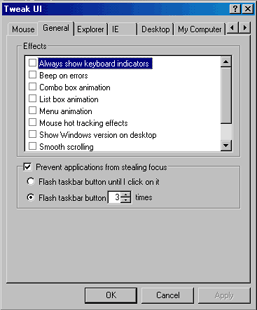 |
| TweakUI Allows you to customize your computing experience |
Microsoft must have thought we're all children when
they designed their user interface. Menus slide down and sideways,
windows transparently resize before actually resizing themselves,
sounds for almost everything. And Windows 2000 is even more pathetic,
with it's fading menus.
These may be cool features, but sooner or later you'll probably
get sick of them. Furthermore, every animation and sound takes a little extra
time. You'll really notice a difference when you turn them off.
To modify these parameters, and a whole lot more of your Windows
experience, install TweakUI, a free Control Panel that let's you customize
windows even more. TweakUi is available as a free download from the Silicon
Guide File Center.
Once it is installed go in the Tweak UI Control Panel, select
the General Tab, and deselect all of the available options.
Next Page:
Save disk space